Using the Combat Tracker & Unified DM Screen
Last updated Aug 10, 2026
Unified DM Screen vs Standard Layout
Dungeon Manager offers two flexible layouts for running combat:
- Standard Layout — A full-width interactive combat tracker emphasizing turn controls, stat blocks, and combat logs.
- Unified DM Screen (
?layout=unified) — A split-screen tactical Command Center that embeds an interactive Leaflet battle map on the left alongside the live tracker on the right.
Switch between layouts anytime using the view mode toggle on the encounter page or combat header.
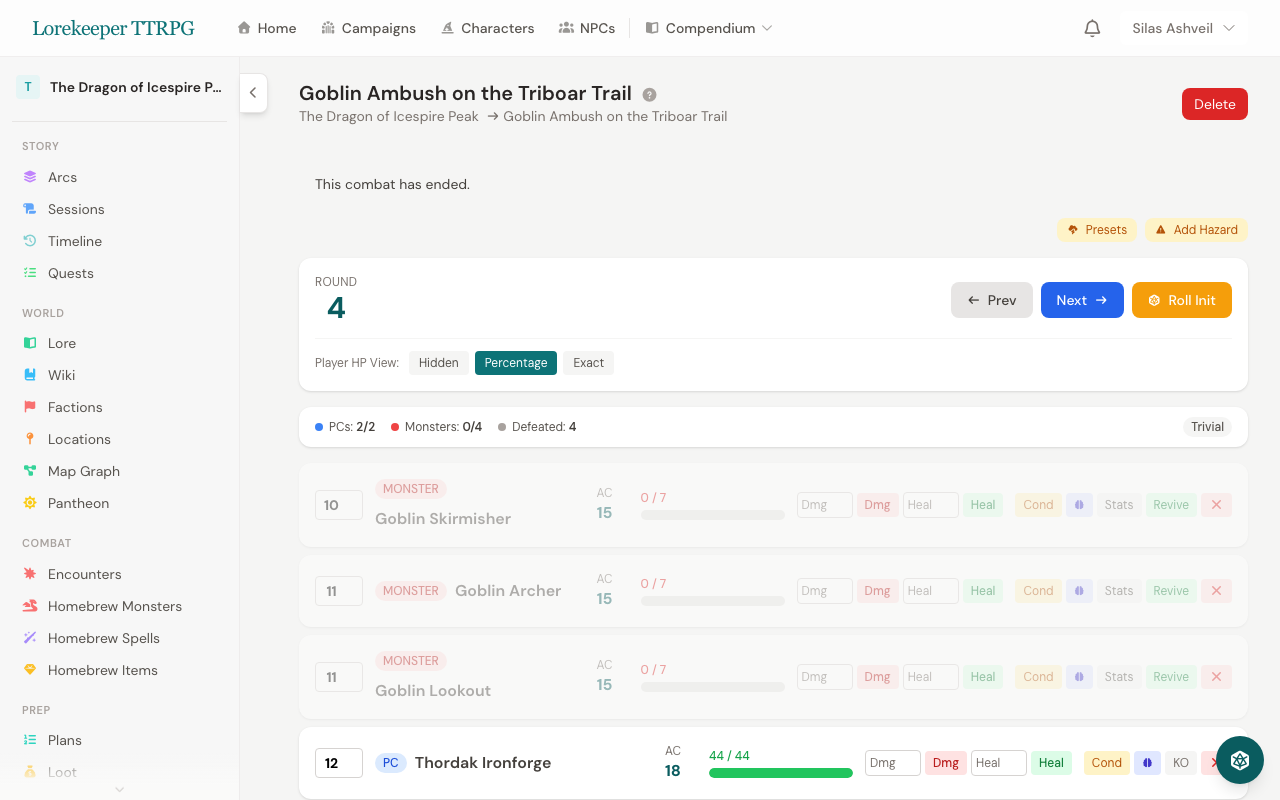
Core Combat Tools
- Initiative & Turn Management — Auto-roll all combatants (d20 + DEX modifier), group identical monsters, and track round counts.
- HP Tracking & Monster Visibility — Fast damage/healing inputs, temporary HP, and 3 monster HP display modes (Hidden, Percentage, Exact).
- Conditions & Concentration — 15 standard D&D 5e conditions with mechanical tooltips and automatic Concentration CON save prompts.
- Death Saves & Boss Actions — Automated PC death save tracker, legendary action counters, and lair action toggles at initiative count 20.
- Combat Pacing & Log — Live active PC/monster counters, elapsed time tracking, difficulty badges, category-filtered logs, and text export.
Was this article helpful?
Thanks for the feedback!